 Rafiq
Rafiq
Security and privacy
Rafiq gives a model real power over your machine. So every permission is yours, and every secret is where it belongs.
Where everything is kept
| What | Where | Who can read it |
|---|---|---|
| API keys and account tokens | Windows Credential Manager | Rafiq's engine only, at call time |
| Search keys and MCP server secrets | Windows Credential Manager | Rafiq's engine only |
| Chats, tasks and designs | A local SQLite database in AppData | You, and the app |
| Settings and the permission policy | The same local database | You, and the app |
| The files the model works on | Your folder, or an isolated git copy of it | Sent to the provider you chose, only when the model asks for them |
Keys never enter the database or the log files, and are never sent to the app's interface. The diagnostics report you can export from Settings carries provider names only, with no key and no conversation content.
A permission policy per tool type
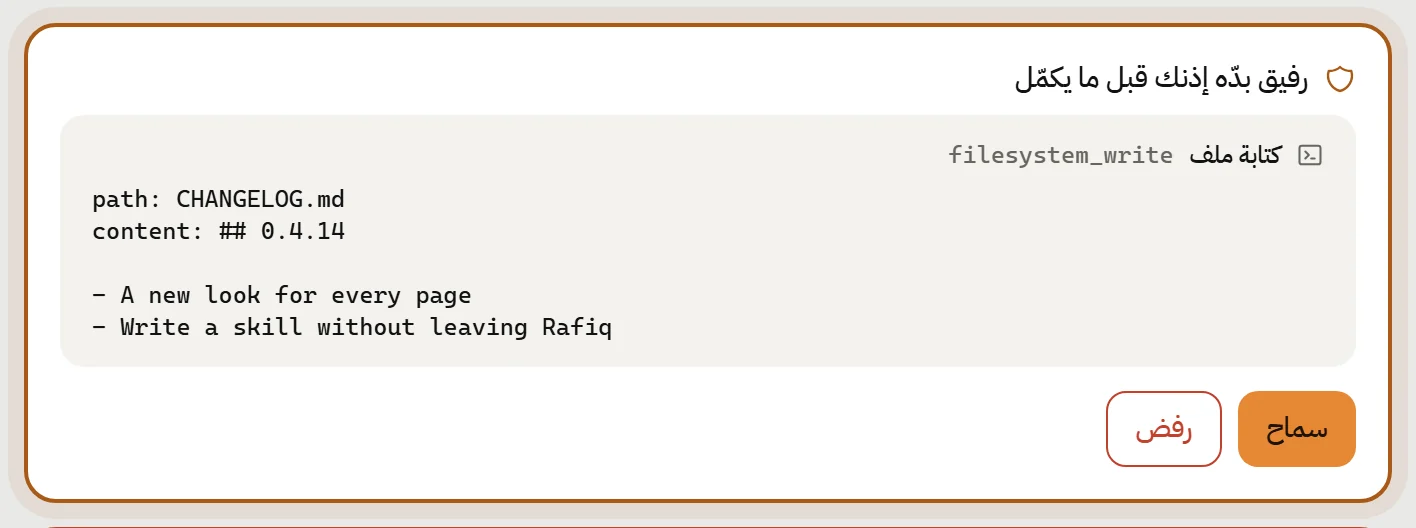
Every tool is classified: read, write, or execute. Reads pass on their own. The rest go through your policy: ask every time, allow always, or deny.
- File writes, shell commands, process management
- Web and browser, and desktop control
- Edits to Jira and other issues, and MCP tools
- The request appears inside the chat or the task page, with the exact command or path
Limits built into the tools themselves
Desktop control is off
You have to switch it on in Settings before the model even sees it. Even then, every action goes through the permission.
The web can't reach your network
The page-reading tool refuses private and local addresses, so it can't be used to reach devices on your network.
git without commits
Task worktrees are created and removed only inside Rafiq's data folder. The model can't commit to your branch or change it.
A browser with its own profile
The browser tools run Edge with a separate profile. Your accounts and cookies in your everyday browser are never touched.
A local engine with a session token
Rafiq's engine runs on your machine on a local port, with a random token per launch. No other process on the machine can call it.
Signed updates
The app verifies the signature of every update before installing it. A tampered update doesn't get through.
Who Rafiq talks to
Four parties, all chosen by you: the provider whose key you added, the search service if you enabled one, the MCP servers you connected, and GitHub's releases page to check for updates. No analytics, no tracking, no Rafiq server.
Ready? Half a minute and it's yours.
One installer, no account. Then add a model key and start.